So I made over 52,000 mistakes today
posted by delano
Earlier today I updated the net-ssh family of Ruby gems and I broke one of the rules of semantic versioning.
Specifically, rule #8:
8. Minor version Y (x.Y.z | x > 0) MUST be incremented if new,
backwards compatible functionality is introduced to the public API.
I broke Chef. I broke Vagrant. net-ssh is pretty far upstream so in just a couple hours there were over 52,000 installs of the offending gems, much to the chagrin of sysadmins and devops folks everywhere.
Note: If you have any of the following gems installed on your system, you should remove them: net-ssh-gateway-1.1.1, net-ssh-gateway-1.1.2, net-ssh-multi-1.1.1, net-ssh-multi-1.1.2, net-scp-1.0.5, and net-scp-1.0.6. See my previous post.
The err of my ways
I released three gems with the PATCH incremented instead of the MINOR version number. This makes a huge difference downstream because of the “twiddle-wakka”:
# Meanwhile, in chef.gemspec
s.add_dependency "net-ssh", "~> 2.2.2"
s.add_dependency "net-ssh-multi", "~> 1.1.0"
The ~> will fuzzily match any gems less than 1.2 but greater than or equal to 1.1.0. This feature strikes a balance between ">= 1.1.0" (which is too loose) and "= 1.1.0" (which is too strict). The problem is that net-ssh-multi-1.1.2 changed the net-ssh dependency to 2.6.5 which made Chef uninstallable due to the conflict between chef.gemspec and net-ssh-multi.gemspec (2.2.x vs 2.6.5). Feels bad man.
So if I ruined your day, send me your email, Twitter, Skype, or phone number and I will reply with a personal apology.
(Offer expires Feb 12th at 07:59 UTC).
On a more positive note
A big thank you to everyone who emailed, tweeted, and opened issues to help get this resolved quickly. Although regrettable, this is the only significant issue with net-ssh and friends in the 4 years (and 18M downloads) that I’ve been maintaining them. I feel pretty good about that.
Incidentally, I updated the THANKS.txt that’s part of every net-ssh release today too. I added the names of all the people who contributed code since I’ve been maintaining it. Here they are:
- GOTOU Yuuzou
- Guillaume Marçais
- Daniel Berger
- Chris Andrews
- Lee Jensen
- Hiroshi Nakamura
- Andreas Wolff
- mhuffnagle
- ohrite
- iltempo
- nagachika
- Nobuhiro IMAI
- arturaz
- dubspeed
- Andy Brody
- Marco Sandrini
- Ryosuke Yamazaki
- muffl0n
- pcn
- musybite
- Mark Imbriaco
- Joel Watson
- Woon Jung
- Edmund Haselwanter
- robbebob
- Daniel Pittman
- Markus Roberts
- Gavin Brock
- Rich Lane
- Lee Marlow
- xbaldauf
- Delano Mandelbaum
- Miklós Fazekas
- Andy Lo-A-Foe
- Jason Weathered
- Hans de Graaff
- Travis Reeder
- Akinori MUSHA
- Alex Peuchert
- Daniel Azuma
- Will Bryant
- Gerald Talton
- ckoehler
- Karl Varga
- Denis Bernard
- Steven Hazel
- Alex Holems
- Andrew Babkin
- Bob Cotton
- Yanko Ivanov
- Angel N. Sciortino
- arilerner@mac.com
- David Dollar
- Timo Gatsonides
- Matthew Todd
- Brian Candler
- Francis Sullivan
- James Rosen
- Mike Timm
- guns
- devrandom
- kachick
- Pablo Merino
- thedarkone
- czarneckid
- jbarnette
- watsonian
- Grant Hutchins
- Michael Schubert
- mtrudel
- and of course, Jamis Buck.
I know I’m not the only one who appreciates your time and effort. Thank you for making net-ssh better!
All future Net-SSH gem releases will now be signed (as of 2.6.5)
posted by delano
**Updated (2013-02-06@13:00PST): Doh. Some previously updated gems were broken. See below. **
In response to the recent vulnerabilities with rubygems.org, I spent the morning signing and re-releasing the Net-SSH family of ruby gems. The discussion on how to properly handle code signing is still ongoing so this could be just an interrim measure; however, the severity of the problem makes it necessary to have a solution in place now.
Current Signed Releases
As of today, all net-ssh releases will be signed and verifiable with the public certificate at the end of this post.
Installation
You can still gem install net-ssh like you do already but if you want to verify the gem is authentic, you will now be able to run:
$ gem install net-ssh -P HighSecurity
To do this, you need to add the public certificate to local trust gem certs (otherwise you’ll see an error like "Couldn't verify data signature"):
$ curl -O https://raw.github.com/net-ssh/net-ssh/master/gem-public_cert.pem
$ gem cert --add gem-public_cert.pem
Broken versions
The following gems were broken:
- net-ssh-gateway-1.1.1
- net-ssh-gateway-1.1.2
- net-ssh-multi-1.1.1
- net-ssh-multi-1.1.2
- net-scp-1.0.5
- net-scp-1.0.6
They’ve been yanked from rubygems.org but if already have them on your system, you will need to remove them manually.
$ gem uninstall -v 1.1.1 net-ssh-multi
$ gem uninstall -v 1.1.2 net-ssh-multi
$ gem uninstall -v 1.1.1 net-ssh-gateway
$ gem uninstall -v 1.1.2 net-ssh-gateway
$ gem uninstall -v 1.0.5 net-scp
$ gem uninstall -v 1.0.6 net-scp
If you have any trouble let me know at net-ssh@solutious.com.
Public certificate
-----BEGIN CERTIFICATE-----
MIIDNjCCAh6gAwIBAgIBADANBgkqhkiG9w0BAQUFADBBMQ8wDQYDVQQDDAZkZWxh
bm8xGTAXBgoJkiaJk/IsZAEZFglzb2x1dGlvdXMxEzARBgoJkiaJk/IsZAEZFgNj
b20wHhcNMTMwMjA2MTE1NzQ1WhcNMTQwMjA2MTE1NzQ1WjBBMQ8wDQYDVQQDDAZk
ZWxhbm8xGTAXBgoJkiaJk/IsZAEZFglzb2x1dGlvdXMxEzARBgoJkiaJk/IsZAEZ
FgNjb20wggEiMA0GCSqGSIb3DQEBAQUAA4IBDwAwggEKAoIBAQDg1hMtl0XsMuUK
AKTgYWv3gjj7vuEsE2EjT+vyBg8/LpqVVwZziiaebJT9IZiQ+sCFqbiakj0b53pI
hg1yOaBEmH6/W0L7rwzqaRV9sW1eJs9JxFYQCnd67zUnzj8nnRlOjG+hhIG+Vsij
npsGbt28pefuNZJjO5q2clAlfSniIIHfIsU7/StEYu6FUGOjnwryZ0r5yJlr9RrE
Gs+q0DW8QnZ9UpAfuDFQZuIqeKQFFLE7nMmCGaA+0BN1nLl3fVHNbLHq7Avk8+Z+
ZuuvkdscbHlO/l+3xCNQ5nUnHwq0ADAbMLOlmiYYzqXoWLjmeI6me/clktJCfN2R
oZG3UQvvAgMBAAGjOTA3MAkGA1UdEwQCMAAwHQYDVR0OBBYEFMSJOEtHzE4l0azv
M0JK0kKNToK1MAsGA1UdDwQEAwIEsDANBgkqhkiG9w0BAQUFAAOCAQEAtOdE73qx
OH2ydi9oT2hS5f9G0y1Z70Tlwh+VGExyfxzVE9XwC+iPpJxNraiHYgF/9/oky7ZZ
R9q0/tJneuhAenZdiQkX7oi4O3v9wRS6YHoWBxMPFKVRLNTzvVJsbmfpCAlp5/5g
ps4wQFy5mibElGVlOobf/ghqZ25HS9J6kd0/C/ry0AUtTogsL7TxGwT4kbCx63ub
3vywEEhsJUzfd97GCABmtQfRTldX/j7F1z/5wd8p+hfdox1iibds9ZtfaZA3KzKn
kchWN9B6zg9r1XMQ8BM2Jz0XoPanPe354+lWwjpkRKbFow/ZbQHcCLCq24+N6b6g
dgKfNDzwiDpqCA==
-----END CERTIFICATE-----
How RethinkDB Says Thanks
posted by delano
I posted a couple weeks ago about my experience installing RethinkDB. Today I got this in the mail:
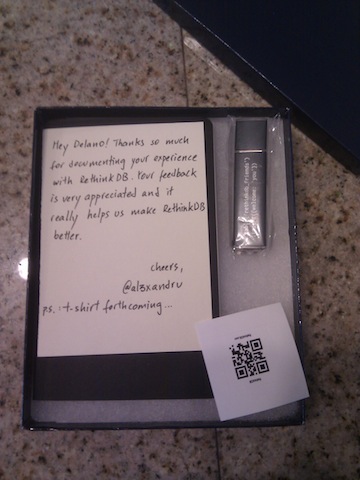
That’s a moleskin and a usb key (with a metal case). The handwritten note is fine touch too.
Thank you @al3xandru and RethinkDB.


